Is It Normal for a New LED Bulb to Flicker With a Dimmer Switch?
It’s common, but it isn’t how a good pairing should behave. A flickering LED on a dimmer means the bulb and the dimmer aren’t compatible, and four checks will usually tell you which one to change.
Most advice stops at “buy a dimmable bulb and an LED dimmer.” The details that solve it are more specific. “Dimmable” on the box has a footnote. There’s an industry standard you can look for on the dimmer package, and many LED dimmers have a hidden adjustment that targets this exact problem. The trailing-edge dimmer people recommend online also needs a neutral wire, which some older wall boxes don’t have.
Why an LED flickers when an incandescent didn’t
The US Department of Energy (DOE) explains it this way. An incandescent filament stays hot through the moments when AC power dips toward zero, so it keeps glowing steadily. An LED has no such persistence. It’s basically on or off, and the small electronic driver inside the bulb decides how smooth its output is.
A standard wall dimmer works by chopping off part of each wave of household power. Some LED drivers are built to read that chopped signal and hold the light steady. DOE says an LED paired with a driver that isn’t designed to respond to a dimmer can flicker as much as 100 percent, all the way from on to fully off.
So the flicker comes from the combination of one bulb’s driver and one dimmer. That’s why the same bulb can behave on one dimmer and misbehave on the next.
Is it harmful?
DOE doesn’t treat flicker as purely cosmetic. Its flicker research describes effects ranging from uncomfortable or distracting to harmful or, rarely, dangerous. It also notes that people vary widely: some see flicker clearly where others see none. That’s why one person in the house may be bothered when nobody else is.
For a sense of scale, DOE describes the IEEE’s 2015 flicker guidance (IEEE 1789). Its “low risk” level is the flicker frequency multiplied by 0.08, in percent. For light pulsing 120 times a second, that’s 120 × 0.08 = 9.6, or a swing of no more than about 10 percent. A bulb that DOE says can swing 100 percent on a mismatched dimmer is far outside that. Percent flicker is hard to measure at home, but anything you can plainly see flickering is worth fixing.
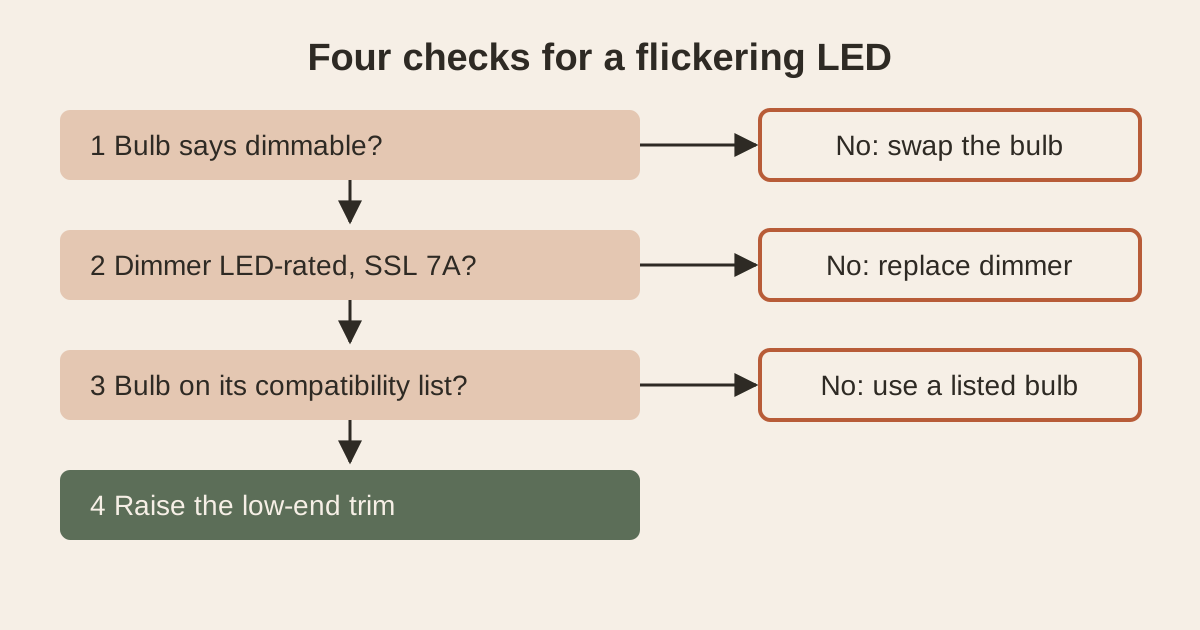
The four checks, in order
1. Read the “dimmable” fine print
A bulb has to say dimmable. Leviton, the dimmer maker, puts that first. ENERGY STAR’s lamp specification adds detail most shoppers never see:
- A bulb marketed as dimmable must be tested on at least five dimmers from at least two manufacturers.
- Only 80% of those tested bulb-and-dimmer pairs have to meet each dimming requirement.
- The package should put an asterisk next to “dimmable,” pointing to a statement like “only compatible with…”.
“Dimmable” means the bulb dims on the dimmers it was tested with. It doesn’t promise every dimmer. Look for that asterisk statement, or check the bulb maker’s website for its list.
2. Make sure the dimmer is rated for LEDs
Leviton’s buying guide says incandescent and halogen dimmers are not designed to control LED bulbs, and using them may give inconsistent or limited performance. Its flicker guidance says older dimmers may not be LED-rated at all. Pull the faceplate (power off first) or check the dimmer’s packaging for an LED rating.
The more useful label to look for is NEMA SSL 7A. NEMA, the electrical manufacturers’ association, published this standard in 2015. It sets compatibility requirements for standard “forward-phase” dimmers used with dimmable LEDs, including screw-in bulbs. California’s 2019 energy code requires forward-phase dimmers used with LEDs in new homes to comply with it. Leviton says to look for “SSL 7A” on the product or its packaging.
NEMA also runs an LED Dimming Compatibility logo for both bulbs and dimmers. Leviton says the logo marks products that dim down to 20% of maximum light, and many LED bulbs go lower.
3. Check the compatibility list
Leviton’s buying guide notes that most bulb and dimmer makers publish compatibility information on their websites. Leviton also offers its own LED compatibility tool. Its buying guide says a poor pairing causes flickering, limited dimming range, slow start-up, or inconsistent light.
If your bulb isn’t on your dimmer’s list, the cheapest test is a bulb that is.
4. Set the low-end trim
Many LED dimmers have an adjustment that sets the minimum light level. Leviton says to check the dimmer’s instruction sheet for it. Setting it helps ensure smoother dimming if you see flicker or other glitches. Raising the floor a little keeps the dimmer out of the range where that bulb gets unstable.
Leviton adds one caveat. Its dimmers meet SSL 7A in their factory default state, and changing the minimum adjustment can take them out of compliance. That can matter where SSL 7A compliance is required, such as new homes in California. Elsewhere, you may decide a steady light is the better trade.
Match the symptom to the fix
Leviton lists the typical LED dimming glitches: noise, flicker or strobing, popping on, dropping out, a limited dimming range, and “ghosting,” a faint glow after the light is switched off.
| What you see | Most likely cause | Try first |
|---|---|---|
| Flickers only near the bottom of the slider | The bulb gets unstable below a certain level on this dimmer | Set the low-end trim higher (check 4) |
| Flickers at every level with every dimmable LED you try, on this dimmer only | Dimmer not rated for LEDs | LED-rated dimmer marked SSL 7A (check 2) |
| One brand flickers, another doesn’t, on the same dimmer | That bulb isn’t compatible with that dimmer | Use a bulb on the dimmer maker’s list (check 3) |
| Buzzing or humming with the flicker | Bulb-dimmer mismatch (noise is on Leviton’s glitch list) | Listed bulb, then an LED-rated dimmer |
| Light pops on bright or drops out when dimmed | Same mismatch | Low-end trim, then a listed bulb |
| Faint glow when switched off | “Ghosting,” also on Leviton’s list of pairing glitches | Try a listed bulb; ask about the dimmer’s wiring (below) |
| Flickers on regular switches too, or across several rooms | Not a dimmer problem | Call an electrician |
Leading-edge, trailing-edge, and the neutral wire
Many household dimmers are forward-phase, also called leading-edge. They’re the type NEMA SSL 7A covers. Trailing-edge dimmers, also called reverse-phase or ELV (electronic low voltage), switch power differently. Leviton says they perform well with LED bulbs.
The catch is the wiring. Leviton says ELV dimmers require a neutral wire in the box, the usually white “return path” conductor. Some older switch boxes don’t have one. SSL 7A also doesn’t cover reverse-phase dimmers, so that logo won’t help you compare them.
For boxes with no neutral, there are no-neutral LED dimmers. Some of these send a small current through the ground wire to power themselves. Leviton’s code summary says the 2017 National Electrical Code allows that only as a retrofit exception, with a limit of 5 such devices per branch circuit. If you’re adding several to one circuit, or you aren’t sure what’s in the box, that’s a reasonable time to bring in an electrician. Our guide on when a repair is worth calling a pro for can help you decide.
Reading the wattage on an LED dimmer
LED dimmers carry a separate LED rating. On Leviton’s list of LED dimmers, the LED ratings run from 150 W to 450 W. Its buying guide lists incandescent capacity at 600 W for a single dimmer in a box.
Add up the wattage printed on every LED bulb the dimmer controls and keep the total within the dimmer’s LED rating. Leviton also notes one difference from incandescent loads: when several dimmers share one wall box, LED loads don’t need the capacity reduction (“derating”) that incandescent loads do.
When it’s not the dimmer
Bulb-and-dimmer flicker usually shows up as soon as the new bulb goes in. Call an electrician when the pattern doesn’t fit that:
- flicker on fixtures with ordinary switches, or in several rooms at once
- flicker that started suddenly in a fixture that had been fine
- a dimmer that’s hot to the touch, or any burning smell (switch it off at the breaker)
Always turn off the breaker before removing a dimmer, and confirm the light is off before touching wires.
FAQ
My bulb says dimmable. Why does it still flicker?
Because “dimmable” means it passed testing on a limited set of dimmers. ENERGY STAR requires testing on as few as five dimmers from two manufacturers, with 80% of the pairs passing. Look for the “only compatible with…” note next to the asterisk on the package, or check either maker’s compatibility list.
Do smart dimmers fix this?
Many are LED-rated, and the same four checks apply. Leviton notes that some dimmers need a neutral wire for the electricity they use to power themselves. That small around-the-clock draw is a cousin of phantom power from idle electronics.
Will a new dimmer fix it if I keep the same bulbs?
Only if that bulb works well with the new dimmer. Check the new dimmer’s compatibility list for your exact bulb before you buy, or buy the bulb off the list along with the dimmer.
Sources
- Flicker Basics and Flicker Research | US Department of Energy — why LEDs lack persistence, up to 100 percent flicker with an unsuitable driver, effects and individual variation
- Flicker Measurement and Standards | US Department of Energy — IEEE 1789 low-risk level of 0.08 × frequency
- ENERGY STAR Program Requirements for Lamps, Version 2.1 — five dimmers from two makers, 80% of pairs, the “only compatible with…” asterisk, 20% minimum light
- NEMA Dimmer Compliance Application Note | Leviton and Title 24 and NEC 2017 Solution Sheet | Leviton — SSL 7A scope, California requirement, NEMA logo, LED ratings, trim and compliance, no-neutral limit of 5 per circuit
- Dimmer Buying Guide | Leviton and How to Avoid Flickering LED Lights | Leviton — incandescent dimmers not designed for LEDs, ELV needs a neutral, 600 W incandescent rating, no LED derating, glitch list, minimum-level adjustment
Written and reviewed by peter.bae for Hearth & Habit · Last reviewed October 11, 2026


Comments
Post a Comment